Getting inquiries on IndiaMART is good for your business. But replying to every buyer by hand can take a lot of time. You may need to open Gmail, read the inquiry, copy the phone number, open WhatsApp, and type a message. When many inquiries arrive, this work becomes harder to manage. If your team handles many customer chats, our guide to a shared WhatsApp team inbox explains how to keep replies in one place.
What if you could send a personal WhatsApp reply when a new IndiaMART inquiry reaches your Gmail inbox, without copying the buyer details by hand?
With SwiftMaze WhatsApp CRM, you can connect Gmail, capture IndiaMART inquiry details, and use an approved WhatsApp template to send a reply. The best part is that you do not need a paid IndiaMART API plan to pull leads for this email-based workflow.
In this guide, you will learn how the process works, what you need, and how to set it up using Gmail and SwiftMaze CRM.
Quick Answer: How to Send Automatic WhatsApp Messages to IndiaMART Leads
To automate WhatsApp replies for IndiaMART leads without a paid IndiaMART API, connect the Gmail account that receives your IndiaMART inquiry emails to SwiftMaze CRM. Then connect your WhatsApp Business number, choose a Meta-approved message template, and set up the automation.
When a new supported inquiry email arrives, SwiftMaze CRM can:
- Read the IndiaMART inquiry email.
- Extract the buyer’s name, phone number, product, and message.
- Save the lead information in the CRM.
- Prepare a personalized WhatsApp template using the inquiry details.
- Send the message through the connected WhatsApp Business Platform setup, when the required permissions and messaging conditions are met.
This removes much of the repeated work of copying lead details and typing the same reply again and again.
Why Do IndiaMART Leads Need Faster Follow-Ups?
IndiaMART helps buyers find suppliers for different products and services. A buyer may send an inquiry to ask about pricing, availability, quantity, or product details.
For example, imagine you sell packaging boxes.
A buyer sends an inquiry for 1,000 cardboard boxes. The inquiry email reaches your Gmail account while your sales team is busy.
Without automation, someone needs to read the email, copy the phone number, open WhatsApp, and write a reply.
If the team is handling several inquiries, some messages may get delayed.
A faster first response helps the buyer know that your business has received the inquiry. Your sales team can then focus on answering questions, discussing requirements, and preparing quotations.
Automation does not guarantee a sale. It simply helps you start the conversation with less manual work.
Read More: WhatsApp CRM vs WhatsApp Business App: Which One Do You Need?
What Is IndiaMART WhatsApp Automation?
IndiaMART WhatsApp automation is a process that helps businesses send WhatsApp messages when new IndiaMART leads are received.
There are different ways to build this workflow.
Some tools connect directly to IndiaMART. Others use separate apps to move the buyer details.
SwiftMaze CRM offers another approach: Gmail-based IndiaMART lead automation.
If IndiaMART inquiry emails are arriving in your Gmail inbox, SwiftMaze CRM can use those emails to collect lead details and start the WhatsApp reply process.
This is useful for businesses that want to automate their email-based inquiry process without purchasing an IndiaMART API plan just to pull leads.
How IndiaMART to WhatsApp Automation Works Using Gmail
The workflow is simple:
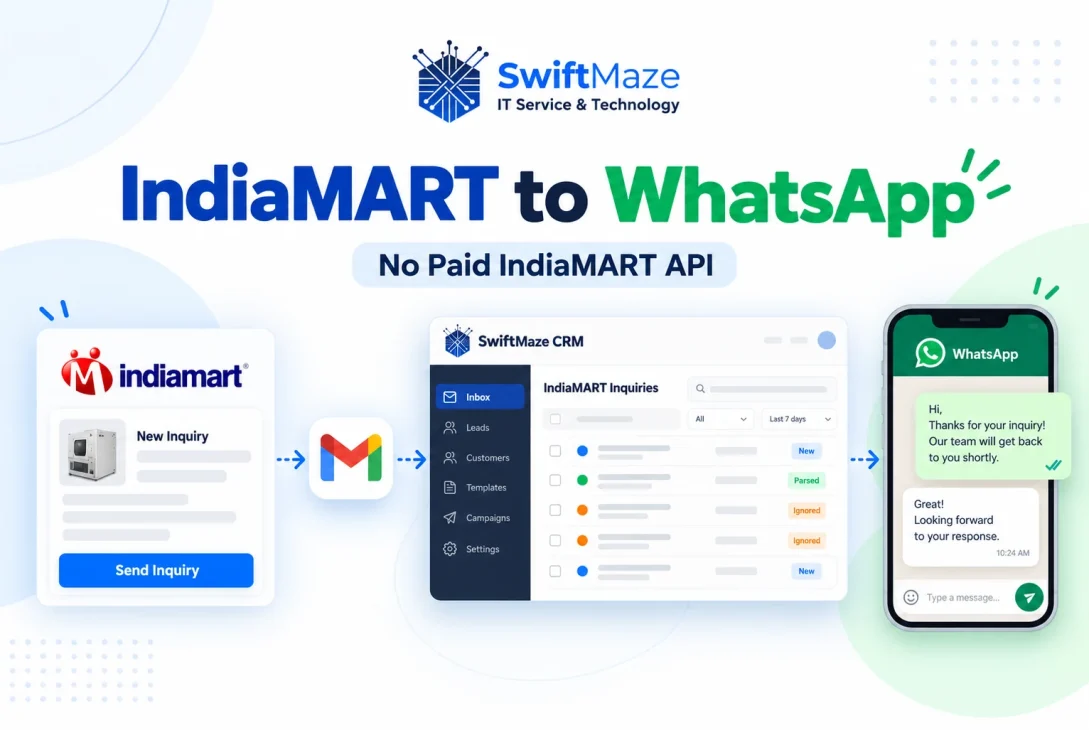
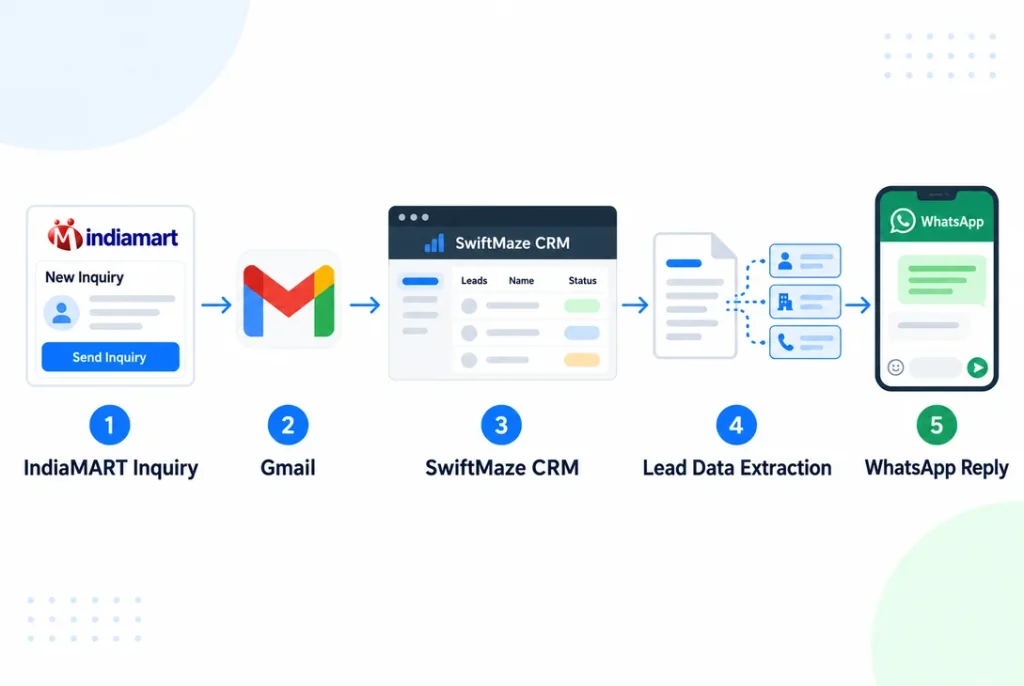
IndiaMART Inquiry → Gmail → SwiftMaze CRM → Lead Data Extraction → Personalized WhatsApp Message
Here is what happens at each stage.
1. A Buyer Sends an IndiaMART Inquiry
A customer finds your product or business on IndiaMART and sends an inquiry.
The buyer may include a product name, quantity, or a short message about the requirement.
2. The Inquiry Email Arrives in Gmail
IndiaMART sends an inquiry notification to your registered email account, based on your IndiaMART email notification settings.
For this workflow, that email needs to arrive in the Gmail account connected to SwiftMaze CRM.
3. SwiftMaze CRM Extracts the Lead Details
SwiftMaze CRM processes the supported IndiaMART inquiry email and reads the available information.
SwiftMaze CRM reads these details when they are present:
- Buyer Name: The name of the person sending the inquiry.
- Phone Number: The contact number available in the email.
- Product Name: The product the buyer is interested in.
- Inquiry Message: The buyer’s requirement or question.
The extracted information is used to create or update the lead record.
4. The Automation Prepares a WhatsApp Message
The CRM uses the saved inquiry details with a Meta-approved WhatsApp message template.
For example, the buyer’s name and product can be used to make the reply more personal.
5. The Message Is Sent Through WhatsApp
When the automation conditions are met, the CRM sends the selected template through the connected WhatsApp Business Platform number.
Your team can then handle the buyer’s response and continue the sales conversation.
What Do You Need Before Setting Up the Automation?
Before you begin, make sure these things are ready.
An IndiaMART Account Receiving Inquiry Emails
You need an IndiaMART account where buyer inquiry notifications are being delivered to an email address.
Check that these emails are reaching your Gmail inbox correctly.
A Gmail Account
You need access to the Gmail account that receives the IndiaMART inquiries.
SwiftMaze CRM uses Google’s account authorization process to connect Gmail. You do not need to share your Gmail password with the CRM.
SwiftMaze CRM Premium or Enterprise Plan
The IndiaMART Gmail-to-WhatsApp automation feature is available in SwiftMaze CRM Premium and Enterprise plans.
You can check the available plans and other features on the SwiftMaze WhatsApp CRM page.
A Connected WhatsApp Business Platform Number
You need the business WhatsApp number that will send messages to buyers.
This number must be connected to SwiftMaze CRM through the supported WhatsApp Business Platform setup.
An Approved WhatsApp Message Template
The first automated WhatsApp message must use an appropriate Meta-approved template.
You must also have the required recipient consent. A buyer sending an IndiaMART inquiry does not automatically mean they have agreed to receive WhatsApp messages.
How to Set Up IndiaMART WhatsApp Automation in SwiftMaze CRM
You do not need to write code for the normal setup. Here is the basic process.
Step 1: Log In to SwiftMaze CRM
Open your SwiftMaze CRM account.
Make sure your business has an active Premium or Enterprise plan with the Gmail automation feature available.
If you are using SwiftMaze CRM for the first time, complete the required account and WhatsApp setup.
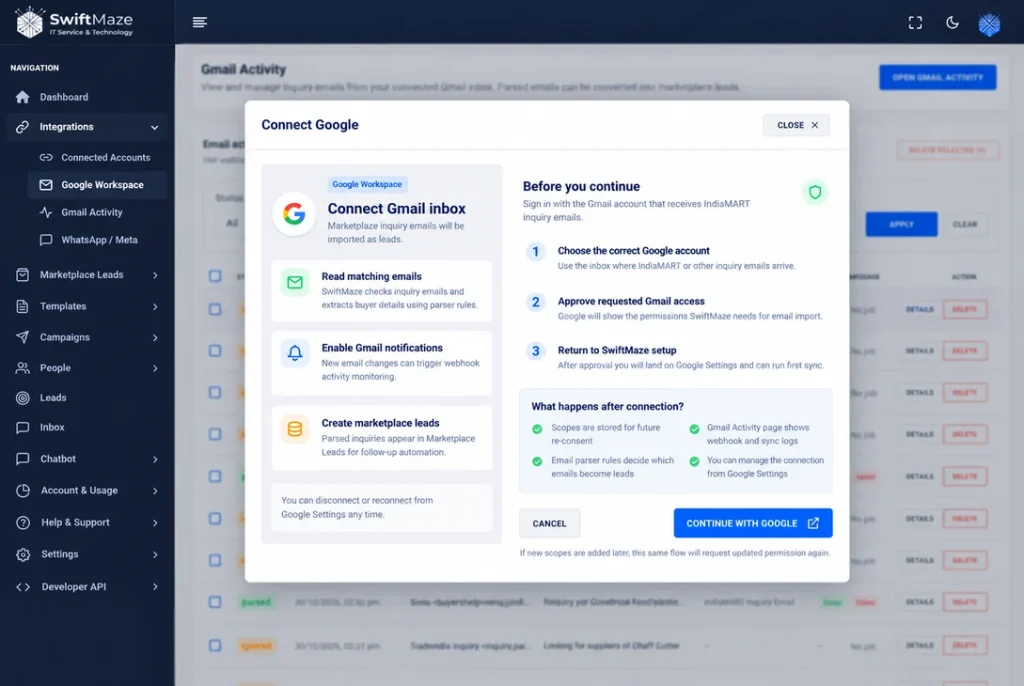
Step 2: Connect the Gmail Account Receiving IndiaMART Inquiries
Open the Gmail integration option in your CRM account.
Choose the Google account that receives your IndiaMART inquiry emails.
Select Connect with Google to give the CRM permission to use the needed Gmail information. Google will show the requested permissions before you approve access.
Select the correct Gmail account and review the permissions carefully.
After the connection is completed, the CRM can use the authorized email data for its configured lead automation.
For more information about how SwiftMaze handles connected Gmail data, read the SwiftMaze Privacy Policy.
Step 3: Connect the WhatsApp Number
Next, make sure the business WhatsApp number you want to use is connected to SwiftMaze CRM.
This is the number buyers will see when they receive your WhatsApp reply.
Use the official WhatsApp Business Platform connection supported by SwiftMaze CRM.
If your number is already connected, check that the connection is active before creating the workflow.
Step 4: Prepare an Approved WhatsApp Template
Create or select a WhatsApp message template that matches the purpose of your communication.
Keep the message short, clear, and useful.
Here is an example of how a personalized reply could look.
Example WhatsApp Message
Hello Amit,
Thank you for your inquiry about Cardboard Packaging Boxes.
We have received your requirement. Our team will review the details and help you with the next steps.
Please reply here if you would like to share more information.
ABC Packaging Team
This is only sample copy. Use a template approved for the correct message category and your permitted use case.
You can use supported template variables for details such as the buyer’s name and product name.
Make sure the name and product details appear in the right places in your approved message.
Read More: How to Send WhatsApp Campaigns Using Approved Templates for more examples of approved messages.
Step 5: Configure the IndiaMART Email Automation
Now set up the workflow that connects Gmail inquiry processing with WhatsApp messaging.
The automation needs to find IndiaMART inquiry emails, read the buyer details, and use your connected WhatsApp number with the selected approved message.
Check that these details go to the correct places:
- Buyer name to the name field in the message
- Buyer phone number to the correct WhatsApp contact
- Product name to the product field in the message
- Inquiry message to the saved lead information
Check the settings before turning on the automation.
Step 6: Test the Complete Workflow
Before using the automation with real buyers, run a controlled test using an account and contact for which you have permission.
Check that:
- A supported IndiaMART inquiry email reaches the connected Gmail inbox.
- SwiftMaze CRM recognizes the inquiry.
- The correct buyer information is extracted.
- The phone number is valid for WhatsApp.
- The approved template uses the correct information.
- The message is processed and its delivery result can be checked.
If a message fails, review the available error details before trying again.
Step 7: Monitor Your Leads and Replies
After testing, keep the workflow active according to your business needs.
SwiftMaze CRM includes handling for duplicate inquiries and failed messages. This helps manage repeated email processing and sending problems.
Even with automation, your team should regularly check incoming leads, delivery results, and customer replies.
Automatic first messages work best when real people are ready to answer the next question.
You can also read about managing customer replies as a team if more than one person handles WhatsApp messages.
Example: How a Manufacturing Business Can Use This Automation
Imagine a small manufacturer receives IndiaMART inquiries every day.
One buyer asks for 500 plastic containers. Another asks for 2,000 packaging boxes. A third buyer wants to know whether a product is available in bulk.
Earlier, a team member needed to open each inquiry email and contact every buyer manually.
With the configured automation:
- The inquiry email arrives in Gmail.
- SwiftMaze CRM reads the supported email.
- The buyer’s name, phone number, product, and message are extracted.
- The buyer details are saved in the CRM.
- The selected WhatsApp template is prepared with the right details.
- The message is sent if the required messaging conditions are satisfied.
The sales team can focus on product details, pricing, and quotations instead of repeating the same first-response task.
This example shows the workflow, not a guaranteed response time or conversion result.
Benefits of Automating IndiaMART WhatsApp Replies
Less Manual Work
Your team does not need to copy every buyer’s phone number from Gmail and prepare the first message by hand.
Personalized First Responses
Instead of sending the same general message to everyone, the automation can use the buyer’s name and product information.
Better Lead Organization
Inquiry details are saved in SwiftMaze CRM, making them easier to manage alongside other customer records and conversations.
Easier Team Follow-Ups
After the first message, your sales team can continue the conversation and track the buyer’s interest.
Read More: How to Build a Lead Management System Using WhatsApp and CRM to learn how to manage new leads and follow-ups.
No Paid IndiaMART Lead API Required
For this email-based method, you do not need to purchase an IndiaMART API plan for pulling inquiry leads.
However, you still need to receive the inquiry emails, use an eligible SwiftMaze CRM plan, and pay any applicable WhatsApp messaging charges.
IndiaMART Email Automation vs IndiaMART API Integration
The two methods can serve a similar purpose, but they collect lead information in different ways.
| Feature | Gmail-Based Automation | IndiaMART API Integration |
|---|---|---|
| Lead source | IndiaMART inquiry emails | IndiaMART API data |
| Paid IndiaMART lead API | Not required for this workflow | May depend on IndiaMART account and API access |
| Main connection | Gmail authorization | Direct API connection |
| Available lead details | Data present in supported emails | Data available through the API |
| Setup | Connect email and configure workflow | Set up direct API access |
| Main limitation | Depends on email delivery and format | Depends on API access and service limits |
The Gmail approach may be a practical choice if you already receive the required inquiry details by email.
An API-based integration may be more suitable when your business needs data that is not available in the email notifications, or requires a different integration process.
The right choice depends on your business needs.
Important Things to Know Before Using the Automation
Automating messages does not remove the need to follow WhatsApp rules or check your lead data.
WhatsApp Permission Is Required
Businesses should send WhatsApp messages only to people who have given the required permission.
An IndiaMART inquiry alone should not be treated as proof of WhatsApp opt-in.
Always follow the official WhatsApp Business Messaging Policy.
Meta Message Charges May Apply
This workflow avoids a paid IndiaMART lead-pull API. It does not make WhatsApp messaging free.
Meta charges can depend on the message category, recipient country, and current pricing rules.
Your SwiftMaze CRM subscription is separate from any applicable Meta messaging charges.
Email Content Must Be Supported
The automation depends on the information received in the inquiry email.
If the buyer’s phone number or another required detail is missing, the message may not be sent correctly.
Changes to IndiaMART’s email format may also require updates to the parsing process.
WhatsApp Delivery Is Not Guaranteed
A message being prepared or accepted for processing does not always mean it has reached the buyer.
Delivery can be affected by recipient availability, WhatsApp rules, account quality, and other messaging conditions.
Review failed messages and do not send repeated unwanted follow-ups.
Best Practices for IndiaMART Lead Automation
For a better buyer experience, follow these simple practices.
- Keep the first message short. Mention the business name and the product the buyer asked about.
- Use the correct template. The approved template should match the real purpose of your message.
- Check customer permission. Do not use inquiry data as permission for unrelated promotions.
- Test missing details. Make sure the workflow handles incomplete emails safely.
- Avoid repeated messages. Check duplicate inquiry handling to reduce unwanted replies.
- Review delivery results. A failed message still needs attention from your team.
- Make human help available. Let buyers speak with your team when they have questions.
Automation should make your sales process easier without making the buyer feel that they are receiving spam.
Frequently Asked Questions
Can I Send Automatic WhatsApp Messages to IndiaMART Leads Without API?
Yes. SwiftMaze CRM can use supported IndiaMART inquiry emails received in Gmail to automate WhatsApp messages. This method does not require a paid IndiaMART API for pulling leads. It still uses the WhatsApp Business Platform for sending messages.
How Do I Connect IndiaMART Inquiries to WhatsApp?
Connect the Gmail account receiving IndiaMART inquiry emails to SwiftMaze CRM, connect your WhatsApp Business Platform number, select an approved template, and configure the automation.
Do I Need a Paid IndiaMART API Plan?
No paid IndiaMART lead-pull API plan is needed for the described Gmail-based workflow. You still need access to the inquiry emails and an eligible SwiftMaze CRM plan.
Does SwiftMaze CRM Automatically Read IndiaMART Inquiry Emails?
Yes. Once the authorized Gmail connection and automation are configured, SwiftMaze CRM can process supported IndiaMART inquiry emails and extract the buyer’s name, phone number, product, and message.
Which SwiftMaze CRM Plans Include This Feature?
IndiaMART Gmail-to-WhatsApp automation is available in Premium and Enterprise plans.
Can I Send a Personalized WhatsApp Message for Each Inquiry?
Yes. Supported details such as buyer name and product name can be used with an approved WhatsApp template. The data must be available in the inquiry email and correctly mapped.
Is IndiaMART WhatsApp Automation Completely Free?
No. You do not need a paid IndiaMART API plan for this email-based lead capture method, but the SwiftMaze CRM plan and applicable Meta WhatsApp message charges still apply.
Will the Automation Send the Same Message Twice?
SwiftMaze CRM includes duplicate inquiry handling. The system should still be tested with real email formats to make sure repeated processing is handled as intended.
Can I Use Any Gmail Account?
You need a Gmail or supported Google account that receives the relevant IndiaMART inquiry emails and can authorize the required access. Use the correct account and review the requested Google permissions during setup.
Does an IndiaMART Inquiry Open the 24-Hour WhatsApp Customer Service Window?
No. An IndiaMART inquiry received by email is not the same as the buyer sending a WhatsApp message to your business. A WhatsApp customer service window opens according to WhatsApp’s own messaging rules, not simply because an email inquiry arrived.
Related WhatsApp CRM Guides
Want to learn more about handling WhatsApp replies and customer leads? These guides can help:
- WhatsApp CRM vs WhatsApp Business App: Which One Do You Need?
- How to Manage WhatsApp Customer Conversations with a Shared Team Inbox
- How to Send WhatsApp Campaigns Using Approved Templates
Final Thoughts
Replying to IndiaMART inquiries should not mean copying phone numbers and typing the same messages throughout the day.
With Gmail-based IndiaMART WhatsApp automation, businesses can reduce manual lead handling and send more relevant first responses through an organized CRM workflow.
SwiftMaze CRM brings Gmail inquiry processing, lead data extraction, approved WhatsApp templates, and customer follow-up into one process.
If your business receives IndiaMART inquiries by email and wants to reduce manual work without purchasing an IndiaMART API plan for pulling leads, this feature may be a useful option.
Want to automate your IndiaMART inquiry replies?
Explore SwiftMaze WhatsApp CRM and ask our team about the Gmail-to-WhatsApp automation available in Premium and Enterprise plans.
You can also contact SwiftMaze Tech to discuss your setup and request a demonstration.
Gmail to WhatsApp Automation IndiaMART Gmail Integration IndiaMART Lead Automation IndiaMART Leads IndiaMART WhatsApp Automation whatsapp auto reply WhatsApp Business API WhatsApp CRM
Last modified: November 3, 2026