
Sending the same WhatsApp message manually to many customers can take a lot of time. It also becomes difficult to track who received the message, who replied, and which customers need a follow-up.
This is where WhatsApp campaigns can help.
With SwiftMaze WhatsApp CRM, businesses can organize contacts, use approved WhatsApp templates, create campaigns, manage customer replies, and continue follow-ups from one system.
In this guide, we will understand how WhatsApp campaigns work and how businesses can use approved templates to send offers, reminders, updates, and other customer messages in a more organized way.
Quick Answer
A WhatsApp campaign allows a business to send a planned message to selected customers or contacts. Instead of sending every message manually, you can prepare an approved WhatsApp template, select the right contacts, create a campaign, and send the message through your WhatsApp CRM setup.
After the campaign is sent, your team can manage customer replies, check campaign activity, and follow up with interested customers from the same workflow.
What Is a WhatsApp Campaign?
A WhatsApp campaign is a planned business message sent to a group of selected contacts.
For example, a business may want to inform customers about:
- A new product or service
- A special offer
- An appointment reminder
- A payment reminder
- An event update
- A booking confirmation
- A service renewal
- An important customer update
Instead of contacting every customer one by one, a campaign helps businesses organize this communication from one place.
The main purpose is not only to send messages. A good WhatsApp campaign workflow should also help your team manage replies and continue the conversation after the message is delivered.
Why Use Approved WhatsApp Templates for Campaigns?
WhatsApp template messages give businesses a structured way to prepare messages for business communication.
You can prepare a message for a specific purpose, complete the required approval process for your WhatsApp setup, and then use the approved template when creating a campaign.
This helps businesses keep campaign messages clear and consistent.
For example, instead of writing a new payment reminder every time, your team can prepare a standard reminder template and use it when needed.
The same approach can be useful for:
- Marketing campaigns
- Customer updates
- Service reminders
- Booking information
- Follow-up messages
- Offers and announcements
Always make sure your campaigns and templates follow the current WhatsApp Business rules applicable to your account and messaging setup.
What Do You Need Before Creating a WhatsApp Campaign?
Before creating your first campaign, it is better to prepare a few things.
1. A Connected WhatsApp Business Setup
Your WhatsApp business messaging setup should be properly connected with your CRM before you start sending campaigns.
2. Organized Customer Contacts
Your customer list should be clean and organized. Keep useful contact information ready so you can select the right audience for each campaign.
3. The Right Message Purpose
Do not create a campaign just because you can send a message.
First decide what you want the customer to do after receiving it.
For example:
- Reply for more information
- Book an appointment
- Ask for a demo
- Check an offer
- Complete a payment
- Contact your support team
4. An Approved Message Template
Prepare the required WhatsApp template and make sure it is ready to use before launching the campaign.
How to Create a WhatsApp Campaign in SwiftMaze CRM
The exact options available can depend on your account setup and plan, but the basic campaign workflow is simple.
Step 1: Open SwiftMaze WhatsApp CRM
Start by opening your SwiftMaze WhatsApp CRM dashboard.
Make sure you are logged into the correct business account and that your required WhatsApp setup is connected.
Step 2: Check Your Contacts
Before creating the campaign, review the contacts you want to reach.
Avoid sending every campaign to every contact.
For example, a customer interested in website development may not need the same message as someone looking for digital marketing services.
Organizing contacts can help you send more relevant communication.
Step 3: Prepare Your WhatsApp Template
Next, prepare the message template you want to use for the campaign.
Keep the message simple and clear.
A customer should quickly understand:
- Who is sending the message
- Why they are receiving it
- What the message is about
- What they can do next
Step 4: Check the Template Before Using It
Before creating your campaign, confirm that the required template is available and ready for use in your WhatsApp messaging setup.
Also check the message carefully for spelling mistakes, wrong information, outdated offers, and incorrect contact details.
Step 5: Open the Campaign Manager
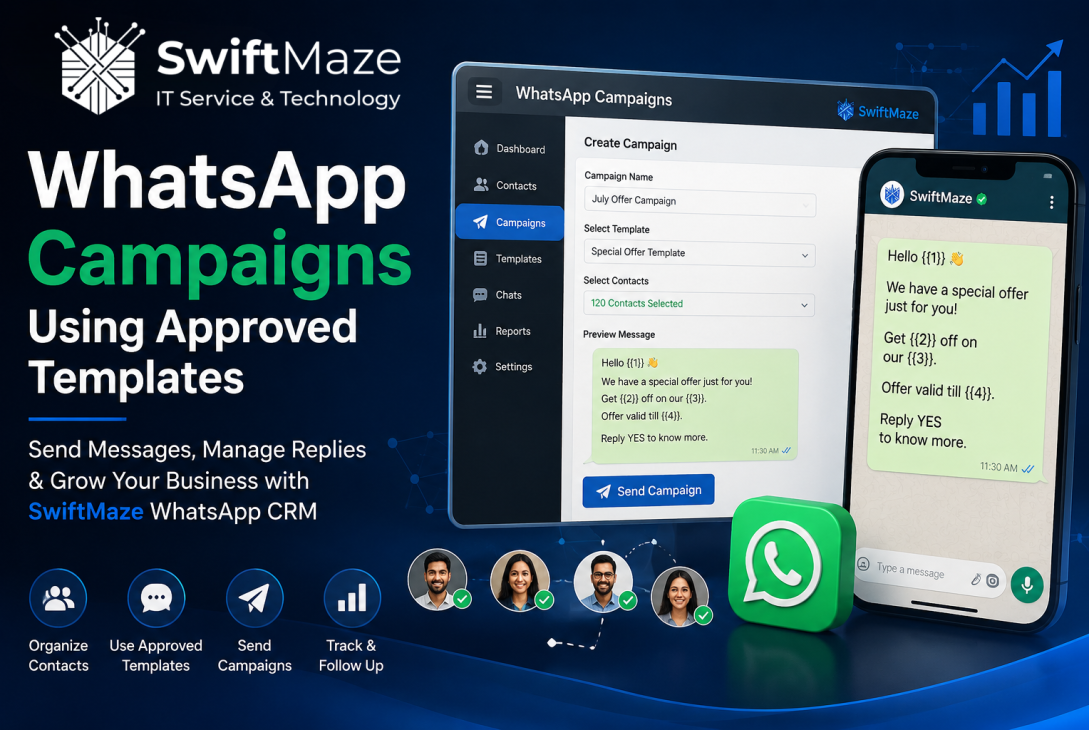
Go to the campaign section inside SwiftMaze CRM and start creating a new WhatsApp campaign.
Give the campaign a clear internal name.
For example:
- July Product Update
- Website Service Follow-Up
- Appointment Reminder Campaign
- Festival Offer Campaign
A clear campaign name makes it easier for your team to identify it later.
Step 6: Select the Right Contacts
Select the contacts you want to include in the campaign.
This is one of the most important steps.
A relevant campaign sent to the right audience is usually more useful than sending the same message to everyone in your contact database.
Step 7: Select Your Approved Template
Choose the correct approved template for the campaign.
Before continuing, preview the message and make sure the selected template matches the purpose of your campaign.
Step 8: Review the Complete Campaign
Do one final check before sending.
Review:
- Campaign name
- Selected contacts
- Selected template
- Message content
- Business information
- Any dates or offer details
A small mistake can create confusion when the same message is sent to many contacts.
Step 9: Send or Schedule the Campaign
When everything is ready, you can proceed with the campaign.
If campaign scheduling is available in your SwiftMaze CRM plan and setup, you can choose a suitable time for the campaign instead of sending it immediately.
Choose a time that makes sense for your customers and the purpose of the message.
Step 10: Track Campaign Activity
Your work should not stop after sending the message.
Check campaign activity and customer responses to understand what is happening after the campaign.
Your team should pay attention to customers who reply, ask questions, show interest, or need additional support.
What Should You Do After Sending a WhatsApp Campaign?
A WhatsApp campaign can start a conversation, but the follow-up process is what helps your team manage the opportunity properly.
After sending a campaign:
- Check incoming customer replies
- Identify interested customers
- Assign conversations when needed
- Update lead information
- Plan the next follow-up
- Answer customer questions quickly
This is where using WhatsApp together with a CRM workflow becomes useful.
If your business receives many WhatsApp leads, you can also read our guide on how to build a lead management system using WhatsApp CRM.
WhatsApp Campaign Examples for Different Businesses
Real Estate
A real estate business can send project updates, site visit reminders, property information, or follow-up messages to interested buyers.
Clinics and Healthcare Businesses
Clinics can use organized messaging workflows for appointment-related communication, reminders, and general patient updates where appropriate.
Education and Coaching
Education businesses can communicate about admissions, course updates, class reminders, events, and important announcements.
Ecommerce and Retail
Retail and ecommerce businesses can communicate product updates, customer service information, order-related updates, and relevant promotions.
Service Businesses
Service companies can use campaigns for booking reminders, service updates, renewal communication, and customer follow-ups.
Best Practices for WhatsApp Campaigns
Keep the Message Simple
Do not add unnecessary information. Customers should understand the main purpose of the message quickly.
Send Relevant Messages
Choose the right audience for each campaign instead of sending every message to every contact.
Use a Clear Call to Action
Tell customers what they can do next.
For example:
- Reply to learn more
- Contact our team
- Book a demo
- Ask for pricing
- Confirm your appointment
Check Everything Before Sending
Always review the message, contacts, template, and important information before launching a campaign.
Be Ready for Customer Replies
Do not send a campaign when nobody from your team is available to handle interested customers.
Your campaign can create new conversations, so your team should be ready to respond.
Track and Improve
Review campaign activity and customer responses. Use what you learn to improve future campaigns and follow-up processes.
Common WhatsApp Campaign Mistakes to Avoid
Sending the Same Message to Everyone
Not every customer has the same requirement. Try to keep campaigns relevant to the selected audience.
Using the Wrong Template
Always confirm that the template matches the campaign purpose before sending.
Not Reviewing the Contact List
A poorly managed contact list can create unnecessary communication and make campaign management difficult.
Ignoring Customer Replies
A campaign is not complete when the message is sent. Customer replies should be handled properly.
No Follow-Up Process
If a customer shows interest but nobody follows up, an important opportunity can be missed.
Sending Without Testing
Review and test your campaign workflow before sending an important message to a larger audience.
How SwiftMaze CRM Helps Manage WhatsApp Campaigns
SwiftMaze WhatsApp CRM brings customer contacts, campaign messaging, template management, team conversations, chatbot replies, and lead follow-ups into one organized workflow.
Businesses can use the system to:
- Organize customer contacts
- Create WhatsApp campaigns
- Use approved message templates
- Manage customer conversations
- Handle replies from a shared workflow
- Track leads and follow-ups
- Review campaign activity
- Use automation and chatbot replies where required
For businesses that also want to capture leads automatically, our guide on how to use WhatsApp chatbot buttons for lead capture explains another useful part of the SwiftMaze CRM workflow.
A Simple WhatsApp CRM Workflow
A complete WhatsApp customer communication process can look like this:
- A customer contacts your business.
- A chatbot or team member collects the requirement.
- The contact is organized inside the CRM.
- Your team follows up with the lead.
- Relevant customers receive useful campaign updates.
- Customers reply to the campaign.
- Your team manages the replies and continues the follow-up.
This creates a more organized process than managing every customer conversation separately on personal phones.
Final Words
WhatsApp campaigns can help businesses communicate with many customers in a more organized way, but sending the message is only one part of the process.
The best workflow also includes organized contacts, the right message template, careful audience selection, campaign tracking, customer replies, and proper follow-ups.
SwiftMaze WhatsApp CRM is built to help sales and support teams manage these activities from one system.
To learn more about the complete platform, visit the SwiftMaze WhatsApp CRM page.
Frequently Asked Questions
1. What is a WhatsApp campaign?
A WhatsApp campaign is a planned message sent to selected customer contacts for communication such as updates, reminders, offers, or follow-ups.
2. Can I send WhatsApp campaigns using SwiftMaze CRM?
Yes. SwiftMaze WhatsApp CRM includes campaign management features for business messaging using the appropriate WhatsApp setup and approved templates.
3. Why are approved templates used for WhatsApp campaigns?
Approved templates provide a structured message format that businesses can use for eligible WhatsApp business communication according to their messaging setup.
4. Can I schedule a campaign in SwiftMaze CRM?
Campaign scheduling is available in supported SwiftMaze CRM plans and configurations. Check your current plan and setup before scheduling a campaign.
5. Can my team manage replies after a campaign?
SwiftMaze CRM is designed to help teams manage customer chats, leads, campaign responses, and follow-ups from an organized workflow.
6. What type of businesses can use WhatsApp campaigns?
WhatsApp campaigns can be useful for many businesses that handle regular customer communication, including real estate, education, healthcare, ecommerce, retail, travel, agencies, and service businesses.
7. Should I send every campaign to all my contacts?
No. It is better to select relevant contacts based on the purpose of the campaign and the customer’s relationship with your business.
8. What should I do after sending a campaign?
Check campaign activity, manage customer replies, identify interested leads, and continue the required follow-up with your team.
Last modified: July 25, 2026